Every Android App Shares One Copy of the Runtime
17 Jul 2026A program has to be in memory to run, since the CPU fetches its instructions from RAM and nowhere else. So when you tap an app, its code must get loaded from the file on disk into memory first. And because every app runs in its own isolated process, each running app must hold its own copy of whatever code it uses. That was my mental model, and both halves felt obvious.
The first half is right. The second half is wrong twice over, and you can see
both mistakes in one file the kernel keeps for every process. /proc/<pid>/maps
lists every region of memory a process can see, and what’s behind it. I
launched a small app of mine, found its process id, and read its map. Here’s
what the Android Runtime library alone looked like:
$ adb shell pidof com.example.app
28112

$ adb shell run-as com.example.app cat /proc/28112/maps | grep libart.so
7618c00000-7618db5000 r--p 00000000 fe:21 85   /apex/com.android.art/lib64/libart.so
7618e00000-7619638000 r-xp 00200000 fe:21 85   /apex/com.android.art/lib64/libart.so
7619800000-7619832000 r--p 00c00000 fe:21 85   /apex/com.android.art/lib64/libart.so
7619a00000-7619a04000 rw-p 00e00000 fe:21 85   /apex/com.android.art/lib64/libart.so
Every line ends in the same file, libart.so, the Android Runtime itself.
The app’s code isn’t sitting in memory as a copy of that file. The file is
the memory, mapped in directly, which is the first thing my model got wrong.
And that same file, inode 85, is mapped into every app on the phone at once,
sharing one physical copy, which is the second. Neither of those is how I
pictured it, so it’s worth walking through how each one actually works.
Mapped, not copied
The mechanism is a system call named mmap, short for memory map. Instead of
reading a file into memory, mmap tells the kernel to make a file appear as
a range of memory. It sets up the process’s page table so a stretch of
addresses is backed by the file, and then it loads nothing at all. The bytes
come in later, one page at a time, only when the CPU actually touches them.
A page is just a fixed-size block of memory, 4 KB on most phones. When the CPU reads an address whose page hasn’t been loaded yet, the hardware raises a page fault, the kernel loads that one 4 KB page from the file into the page cache, its in-RAM store of file pages, fixes the page table, and lets the instruction continue as if nothing happened. So a 100 MB library doesn’t cost 100 MB to open. It costs nothing up front, and then it pays 4 KB per page, but only for the pages the app really runs. Most of any library is code paths you never hit, and those pages never load.
That’s why the map shows the file rather than a copy. When ART starts your
app, it mmaps libart.so and your app’s own code, and the
pages fault in as they’re needed. The file on disk stays the source of truth,
and memory is just a window onto it.
One file, three kinds of page
Look again at those four libart.so lines, specifically the permission bits
at the start of each: r--p, r-xp, r--p, rw-p. The same file is mapped
four times, in separate pieces, with different permissions. Those permissions
sort every page into one of a few kinds:
r-xpis code: readable and executable, but not writable. This is ther-xp 00200000line, the actual machine instructions of the interpreter, the just-in-time compiler, the garbage collector. The CPU runs these.r--pis read-only data: readable, not writable, not executable. Constants and tables the code reads but never changes.rw-pis writable data: the library’s global variables, which it needs to change as it runs.
A file laid out this way, with code in one section and data in others, is an ELF file, short for Executable and Linkable Format, the standard shape of every native binary and library on Android. The compiler and linker decide, at build time, which bytes are code and which are data, and they record it in the file’s headers. At load time the kernel reads those headers and maps each section with the matching permissions. So the split you see in the map isn’t the kernel guessing. It’s the layout baked into the file, enforced by hardware once it’s mapped, which is also what stops a bug from writing over your code: those pages simply aren’t writable.
The part that surprised me: one copy, many apps
Here’s the mistake I care about most, because I’d never questioned it. I assumed ten running apps meant ten copies of the framework’s code in RAM. They don’t. There’s essentially one, and the rest of each app’s memory is its own.
The lever is that libart.so is a file. When two processes both mmap the
same file, the kernel doesn’t load it twice. It loads the file’s pages into
physical memory once, in a shared page cache, and points both processes’ page
tables at those same physical pages. Every app on the phone maps the same
libart.so, inode 85, so every app is looking at one physical copy of the
runtime. The isolation between processes is real, but it’s isolation of
address spaces, not of the bytes those addresses land on.
You can measure the sharing directly. dumpsys meminfo reports two numbers
for shared-library memory, both in kilobytes: the total pages physically mapped
in (Rss), and the app’s proportional share of them (Pss), which splits each
shared page evenly across everyone using it.
$ adb shell dumpsys meminfo com.example.app
                   Pss  Private  Private             Rss
                 Total    Dirty    Clean           Total
     .so mmap     8729      172     6596           31040
The app has 31 MB of shared-library pages resident, the Rss, but only about 6.7 MB of that is truly its own, the two Private columns added together. The other roughly 24 MB is physically shared with every process using those libraries. The 8.7 MB Pss is what the app is fairly charged: its 6.7 MB of private pages plus a small slice of that shared 24 MB, the shared total divided across everyone using it. So it touches 31 MB, answers for 8.7 MB, and holds only 6.7 MB alone. The shared part isn’t duplicated per app, it’s the one physical copy, split in the accounting so nobody is billed for the whole thing. That gap between the 31 MB it touches and the 8.7 MB it answers for is the whole point: it’s why running twenty apps doesn’t cost you twenty times the framework’s memory, because all twenty are drawing on the same physical copy.
That leaves the writable pages, the rw-p ones, since two apps clearly can’t
share globals they each change. Those use copy-on-write. All the processes
start out pointing at the same physical copy, marked read-only underneath, and
the moment one of them writes to a page, the kernel quietly makes that process
a private copy of just that page. So even writable data is shared right up
until the instant it’s actually changed, and only the changed pages ever
diverge.
There’s an Android-specific reason every app gets this sharing for free, and
it’s the part worth knowing because interviewers reach for it. ART isn’t
shipped inside your APK. It lives in the system image, these days in an
updatable module called the ART APEX, the /apex/com.android.art/ path in the
maps above. At boot Android starts one special process, the Zygote, which
loads the runtime once and preloads the common framework classes into its
heap. Every app you launch is then made by calling fork() on the Zygote, so
the new process begins as a copy of that already-warmed one, and copy-on-write
lets it inherit all of it, the runtime code and the preloaded framework,
without duplicating a byte until it writes something. So hundreds of running
apps don’t each pay for their own copy of the runtime. They all branch off the
single Zygote. And because that runtime ships in the com.android.art APEX, a
Mainline update to it swaps in a new libart.so that takes effect on the next
reboot, when the Zygote reloads it and every app starts forking from the new
copy.
It’s easy to overstate that, so one careful distinction. None of this means
every app runs inside a single ART. Each app is its own process running its
own instance of the runtime, with its own heap, its own threads, its own
garbage collector, and its own private JIT cache, the per-process
/memfd:jit-cache in the next section. What all of them share is only the
read-only machinery, the runtime’s code and the preloaded pages that nothing
writes to. The instant a process changes something, copy-on-write hands it a
private page. So “one copy of the runtime” means one copy of the runtime’s
code and preloaded memory, not one runtime that every app runs inside.
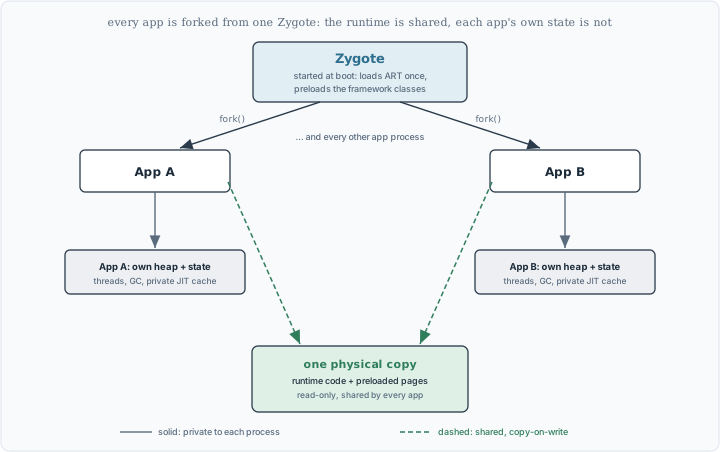
One Zygote, forked into every app: the read-only runtime is shared, each app’s own heap and state is not.
The one thing that can’t be shared
If sharing comes from being a file, then code with no file behind it can’t be shared, and there’s exactly such a case on every running app. When the just-in-time compiler turns a hot method into native code while the app runs, that code has to live somewhere executable, but there’s no ELF file for it. It goes into the JIT code cache, and the cache shows up in the map looking different from everything else:
$ adb shell run-as com.example.app cat /proc/28112/maps | grep jit-cache
46000000-48000000 r--s 00000000 00:01 5525573   /memfd:jit-cache (deleted)
48000000-4a000000 r-xs 02000000 00:01 5525573   /memfd:jit-cache (deleted)
75e5c2d000-75e9c2d000 rw-s 00000000 00:01 5525573   /memfd:jit-cache (deleted)
/memfd:jit-cache (deleted) means memory that was handed a file descriptor
but has no file on disk, which is why it says deleted: there’s nothing to
share through the page cache, because there’s no real file to share. The code
in there was compiled for this process, with addresses that only make sense in
this process, so even if you could hand it to another app it would be wrong.
Each app compiles its own and keeps it to itself, which is the exact opposite
of the shared libart.so, and it’s why the compiled output of the runtime
below it is shared while the runtime’s own on-the-fly output above it is not.
There’s a second thing hiding in those three lines, and it’s a nice one. The
same cache is mapped once as rw-s, writable but not executable, and again as
r-xs, executable but not writable, and never as both at once. That’s
write-xor-execute, a security rule that says no page should be writable and
executable at the same time, since that’s what lets an attacker write bytes
and then run them. The compiler writes new code through the writable window,
and the CPU runs it through the executable window, two views of the same
memory, so the rule holds even for code being generated live. I’d read about
that mechanism, and it was satisfying to see it sitting right there in the raw
map.
Why the file has to be lined up
One small thing makes the whole map-don’t-copy trick possible, and it happens
back at build time. Mapping works in whole pages from page boundaries, so a
library packed inside the APK can only be mapped in place if it starts exactly
on a 4 KB line. If it started at some odd offset, its pages wouldn’t line up
with the kernel’s, and the phone would have to fall back to copying the whole
library into RAM, losing the sharing and the lazy loading in one go. The build
step that prevents this is zipalign, which pads the APK so each uncompressed
library begins right on a page boundary. It’s a pass most Android developers
have seen in their build and never thought about, and this is the thing it
quietly buys you.
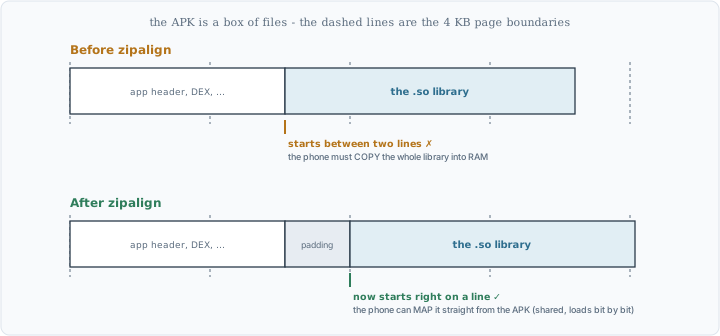
Before and after zipalign: the padding that lets a library be mapped in place instead of copied into RAM.
The page size itself is changing
Everything above rests on one number, the size of a page, and I’ve been saying 4 KB. That number isn’t a law of nature, it’s a setting, and Android is in the middle of changing it. Since Android 15, devices can be built with 16 KB pages instead of 4 KB, and Google now requires apps to cope: from November 2025, new apps and updates on Google Play that target Android 15 or higher must support 16 KB page sizes.
Bigger pages are a straight trade. The system deals in whole pages, so with 16 KB pages there are a quarter as many to track, which means fewer page faults, less bookkeeping in the page table, and less pressure on the small hardware cache that translates addresses. Google measured app launches about 3% faster on average under memory pressure, up to 30% for some apps, and boot time dropping by roughly 8%. The cost is memory. Since a page is the smallest unit the system hands out, data that spills one byte past a page still takes a whole page, and at 16 KB that rounding waste is larger. You give up a little RAM for fewer, cheaper page operations.
Here’s the catch, and it comes straight back to alignment. A native .so
library has its segments aligned to 4 KB inside the file, because that’s what
4 KB pages needed. On a 16 KB device those segments no longer land on page
boundaries, so the library can’t be mapped and the app crashes on load. The
fix is to rebuild the library with 16 KB segment alignment, which the current
NDK, the Native Development Kit, now does by default, and to pad the APK to
16 KB lines, which is exactly what zipalign -P 16 means. This is why the
requirement targets apps with native code. If your app is pure Kotlin or Java
with no native libraries, nothing in it is aligned to 4 KB, so it already runs
on either page size unchanged.
The change is real but still rolling out. Even my own phone, running Android 15, still runs 4 KB pages today:
$ adb shell getconf PAGE_SIZE
4096
So the 4 KB in this whole post is still what most hardware uses right now, and 16 KB is the direction, testable on the Android 15 emulator and already required for new native code on Play. The mechanics don’t change. Mapping, faulting, sharing, and alignment all work exactly the same, only the size of the block moves, and everything built on top has to agree on the new number.
What to take away
The thing to keep is that your app doesn’t get its own copy of the runtime.
One physical copy of libart.so is mapped into every app on the phone at
once, and each process gets its own address space pointing at those same
shared bytes, not its own bytes. That works because the code is mapped rather
than copied, so the file itself is the memory and pages fault in only as they
run, which leaves a single copy to share instead of a duplicate per app. The
one exception is code with no file behind it, the JIT’s output, which each app
compiles and keeps to itself, and that’s the case that proves sharing comes
from being a file in the first place. None of this shows from inside the app,
which runs the same either way. The only way I actually believed it was to
open /proc/<pid>/maps and read what was really there, which, like the last
time, convinced me more than anything I’d read.
Every map line and number here came from a real, unrooted phone (arm64),
read live with adb shell run-as <pkg> cat /proc/<pid>/maps and
adb shell dumpsys meminfo <pkg>; run-as works because the app was a debug
build. The Pss versus Rss distinction, and the meaning of the permission
bits and memfd, are standard Linux
proc(5) behavior. ELF
segments, mmap, and Android’s use of zipalign are documented at
source.android.com and
developer.android.com. The
Zygote fork model, framework-class preloading, and copy-on-write page sharing
are described at
source.android.com/docs/core/runtime/zygote;
that an APEX update, including the ART module, activates only on reboot is from
source.android.com/docs/core/ota/apex.
The 16 KB page-size change, the November 2025 Play requirement, and the launch and
boot numbers are from
developer.android.com/guide/practices/page-sizes.
The sizes came from watching, not reading.