Your CPU Looks Up Every Address Twice
22 Jul 2026Reading a variable feels like one step. The variable lives at some address, so the CPU goes to that address and grabs the bytes. One lookup, done. That was how I pictured it, and for years nothing made me question it.
It’s two steps. Before the CPU can fetch anything, it has to turn the address your program uses into the real address in physical memory, and only then does it fetch the data. So every single memory access is a translate followed by a fetch, two lookups, not one. The fetch is the part everyone thinks about. The translate is the hidden half, and it has a whole little machine behind it with a cost you can measure. It’s also the exact thing Android has been re-tuning lately, which is where this gets concrete. So it’s worth asking what “translate an address” even means.
The ledger
Your program never sees real memory. It works in virtual addresses, its own private numbering that starts at zero and pretends the whole address space is its own. Real memory, physical RAM, is laid out completely differently and shared across every process. Something has to map one to the other, and it does that in fixed-size blocks called pages, 4 KB each on most phones. So the mapping is really “virtual page X lives in physical frame Y.”
That mapping is stored in a table, one row per page: virtual page, the physical
frame it currently sits in, and the permissions on it. It’s a plain ledger, and
it’s exactly what you’re looking at when you read /proc/<pid>/maps on a
running process, each line there is a run of pages the ledger describes, with
those r-xp and rw-p permission bits. Keeping this ledger is real work: rows
get created when memory is mapped, torn down when it’s freed, and looked up on
every access. And it’s not one flat table but several levels deep, so a single
lookup walks through several rows to reach the final answer.
Which is the problem. The ledger lives in RAM, and it’s multi-level, so translating one address means several extra trips to memory before you’ve fetched a single useful byte. Do that on every access and memory would feel several times slower than it is. You clearly can’t walk the ledger every time. So you cache the answers.
The cache in front
The cache is a small, very fast table that sits right on the CPU and remembers recent translations. It’s called the TLB, the Translation Lookaside Buffer, and each entry holds one page’s answer: which physical frame it maps to, plus its permissions. In other words, a TLB entry is just a copy of one of the ledger’s rows, kept on the chip. On every access the CPU checks the TLB first.
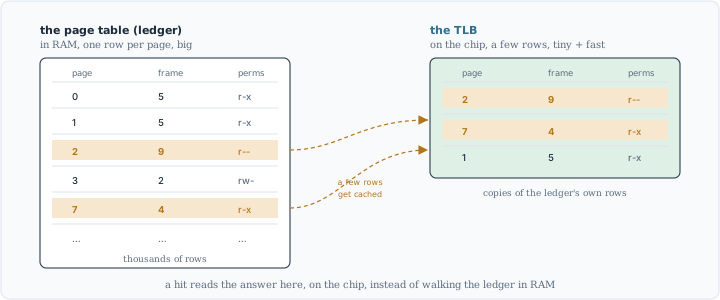
The TLB isn’t a different structure, it’s a few of the ledger’s own rows, cached on the chip so a hit skips the walk.
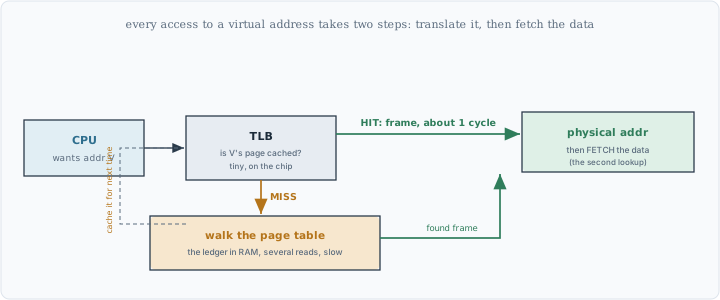
Every access first translates through the TLB, then fetches. A hit is about a cycle; a miss pays for a walk of the ledger in RAM.
If the page is in the TLB, that’s a hit: the translation comes back in about a cycle and the CPU goes straight to fetching the data. If it isn’t, that’s a miss: now the multi-level ledger in RAM has to be walked the slow way. On ARM a dedicated hardware unit does this walk automatically, there’s no software trap, and once it finds the answer it drops it into the TLB so the next access to that page is a hit.
One distinction is worth pinning down, because the words sound alike. A TLB miss is not a page fault. A miss means the page really is in memory and the ledger has its row, the translation just wasn’t cached, so the fix is a walk through RAM, which is fast-ish. A page fault means the page isn’t in RAM at all yet and has to be loaded from disk, which is far slower. Different problems, wildly different costs. (The TLB is also a separate thing from the L1/L2/L3 caches you may have heard of. Those hold the actual bytes; the TLB holds only where the bytes are.)
The TLB is the fix, but it introduces its own limit: fast on-chip memory is expensive, so the TLB is tiny, only a few thousand entries. Which raises the real question. If it’s that small, how much memory can it actually cover before it starts missing on everything?
The ceiling
There’s a simple formula for it. The TLB can translate, without a miss, exactly as much memory as it has entries, times the size of a page. That product is called its reach.
Put in a number. Real TLBs run from a few hundred to a few thousand entries; I’ll use around 2000 for round arithmetic. With 4 KB pages that reaches about 8 MB (2000 times 4 KB), the amount of memory whose translations fit in the cache at once. As long as the code and data a program is actively touching stays under that, translations are mostly hits and the cost stays invisible.
Go past it and the TLB starts thrashing. Every access is to a page whose translation got evicted, so it misses, walks the ledger, evicts another entry, and the next access misses too. The CPU spends its time translating instead of computing. Nothing in your code looks wrong; the program just runs slower for reasons that never show up in the source. It’s a genuinely hidden tax.
So you’d like a bigger reach. But you can’t just add TLB entries, that’s the expensive hardware you were trying to avoid building more of. Look at the formula again, though. Reach is entries times page size, and there are two factors. If you can’t grow the first, grow the second.
The knob
Make the pages bigger. Keep the same ~2000 entries but use 16 KB pages instead of 4 KB, and the reach goes from about 8 MB to about 32 MB. Four times the coverage, from the exact same hardware, for free.
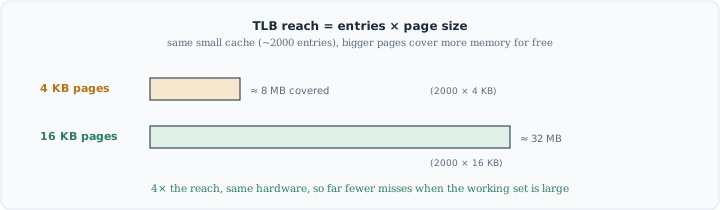
Bigger pages multiply the reach of the same small cache. Four times the coverage, no new hardware.
And the reach isn’t the only thing that improves. With pages four times larger there are a quarter as many of them for the same memory, which means fewer page faults and a smaller ledger to maintain. Bigger pages are cheaper to manage across the board.
They aren’t free, though. A page is the smallest unit the system hands out, so anything that spills one byte past a page boundary still costs a whole page. A 17 KB allocation takes 20 KB with 4 KB pages (five of them, the last barely used), but 32 KB with 16 KB pages (two, the second almost empty), the same data wasting 15 KB instead of 3. Multiply that rounding across every mapping and you spend a little more RAM. It’s a straight trade: some memory, for fewer and cheaper translations.
You might wonder why 16 KB specifically, and not 32 or 64. Two separate things are going on. First, the set of choices is fixed by the hardware: the ARM64 architecture only defines three page sizes at all, 4 KB, 16 KB, and 64 KB (and a given chip implements some subset of those), so 32 KB was never even an option.
Second, among the sizes that do exist, 16 KB is the sweet spot. Moving from 4 KB to 16 KB already captures most of the reach benefit, while 64 KB would waste far more memory to that rounding for little extra gain. Apple’s ARM chips have run 16 KB pages for years, so it was a proven balance before Android reached for it.
What Android actually did
This isn’t hypothetical. It’s the migration Android is in the middle of right now. Since Android 15, devices can be built with 16 KB pages, and Google has started requiring apps to cope: from November 2025, new apps and updates on Google Play that target Android 15 or higher must support 16 KB page sizes. Google’s own measurements put app launches around 3% faster on average, up to 30% for some apps, and boot time down by roughly 8%, at the cost of a little more memory.
There’s a catch, and it lands right back on something concrete. A native .so
library has its internal segments aligned to 4 KB, because that’s what 4 KB
pages needed. On a 16 KB device those segments no longer sit on page boundaries.
The loader maps each segment directly from the file, and a memory mapping has to
start on a page boundary, so a misaligned segment can’t be mapped at all: the
call fails, and the app crashes on load rather than merely loading slower. The fix is to
rebuild the library with 16 KB alignment, which the current NDK, the Native
Development Kit, now does by default, and to pad the APK so each library starts
on a 16 KB line, which is exactly what zipalign -P 16 does. That’s why the
requirement only targets apps with native code. A pure Kotlin or Java app has
nothing aligned to 4 KB in the first place, so it runs on either page size
unchanged.
The change is real but still rolling out. Even my own phone, running Android 15, still uses 4 KB pages today:
$ adb shell getconf PAGE_SIZE
4096
So the 4 KB I’ve been using throughout is still what most hardware runs right now. 16 KB is the direction, testable on the Android 15 emulator and already required for new native code on Play. And notice that nothing about the mechanism changes. Mapping, translating, hitting and missing in the TLB, it all works exactly the same. Only the size of the block moves, and everything built on top has to agree on the new number.
What to take away
The thing to keep is that reading memory is never one step. Every access is translated from a virtual address to a real one before the data is fetched, and that translation runs through a ledger in RAM with a small, fast cache in front of it. The cache is what makes it affordable, and how much memory the cache can cover, its reach, is entries times page size. That reach is a ceiling, and page size is the dial that raises it.
Which is what Android’s 16 KB move really is. Not a piece of trivia about a build flag, but a turn of that dial: bigger pages, wider reach, fewer of the translations that quietly slow a program down. None of it is visible from inside your app, which runs the same either way. The only reason I believe any of it is that the page size is a number you can print, and when I printed it, it was exactly the 4 KB the whole story rests on.
The getconf PAGE_SIZE reading came from a real phone (arm64) running
Android 15, not from documentation. The page table, the TLB, the meaning of a
translation and of TLB reach are standard virtual-memory behavior, described for
Arm in the
Armv8-A address translation guide,
which also documents the 4/16/64 KB granule set. The 16 KB page-size change, the
November 2025 Play requirement, the zipalign -P 16 alignment, and the launch
and boot figures are from
developer.android.com/guide/practices/page-sizes.
The reach numbers use an illustrative ~2000-entry TLB to make the arithmetic
concrete; real TLB sizes vary, but the 4x jump from the page-size change does
not.